
Where to Find It
Menu → Manufacture → Command Centre — the first entry in the Manufacture menu (it replaces the old Insights page). The three buttons in the banner jump straight to the Factory Activity Board, the Session Manager and Shop Floor Orders; the badges on them show how many sessions need resolving and how many shop orders are overdue.
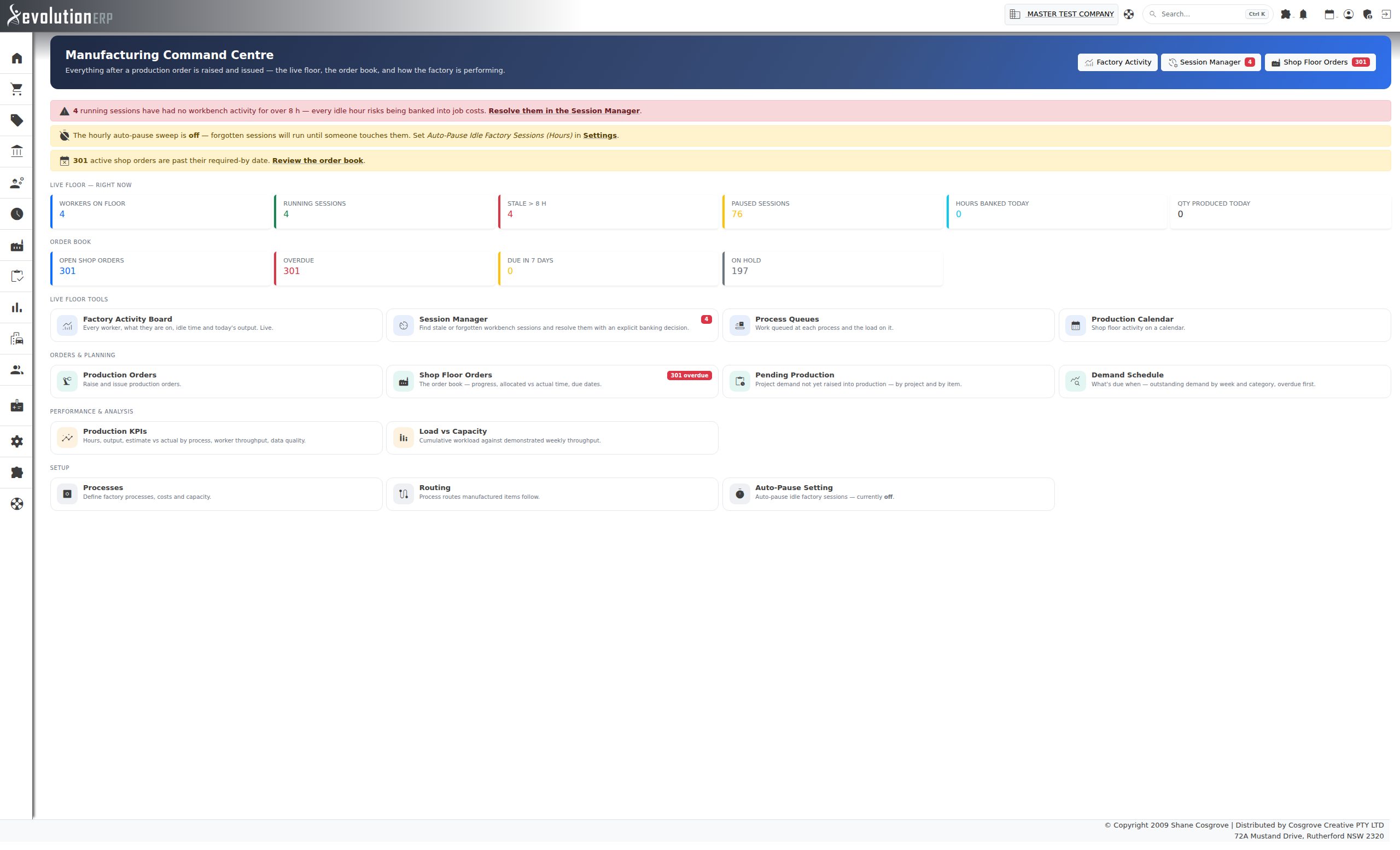
Alerts
A coloured band under the banner lists only the things that need someone to act. When nothing is wrong, the band is not shown.
| Alert | What it means and what to do |
|---|---|
| Stale sessions red | Workbench sessions are still running but nobody has touched them for longer than the stale window (the auto-pause setting, or 8 hours when auto-pause is off). Every idle hour is at risk of being banked into job costs when the session is next paused. Follow the link to the Session Manager and resolve them. |
| Auto-pause is off amber | Forgotten sessions will keep running until someone notices. Turn on Auto-Pause Idle Factory Sessions in Settings. |
| Overdue shop orders amber | Active shop orders are past their required-by date. The link opens the order book. |
Live Floor & Order Book
Two rows of figures sit under the alerts. Click any figure to open the screen behind it.
- Live floor — right now: workers on the floor, running sessions, stale sessions, paused sessions, hours banked today and quantity produced today.
- Order book: open shop orders, how many are overdue, how many are due in the next 7 days, and how many are on hold.
Tools
Every manufacturing screen is listed as a tile, grouped by the job it does:
| Group | Tiles |
|---|---|
| Live floor tools | Factory Activity Board, Session Manager, Process Queues, Production Calendar |
| Orders & planning | Production Orders, Shop Floor Orders, Pending Production, Demand Schedule |
| Performance & analysis | Production KPIs, Load vs Capacity |
| Setup | Processes, Routing, Auto-Pause Setting (shows whether it is on) |
Tiles with a red badge, such as Session Manager and Shop Floor Orders, have something waiting.