
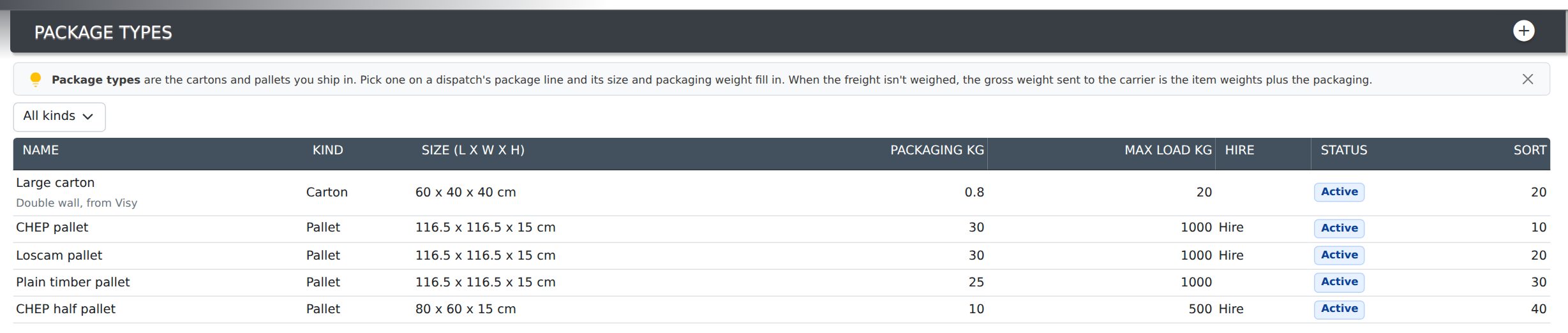
The Package Types screen holds the cartons and pallets your business ships in — your standard carton sizes, the CHEP or Loscam pallets you hire, the plain timber pallets you build up yourself. Pick one on a dispatch’s package line and its size and empty weight fill in, so nobody measures the same carton twice.
Find it under Shipping → Package Types in the menu.
The empty weight matters because carriers charge on gross weight: the goods and what they are packed in. A loaded pallet can carry 25–30 kg of timber that the item weights alone leave out. Record each package type’s packaging weight and Evolution adds it for you whenever the freight hasn’t been weighed.
What Each Field Is For
| Field | What it does |
|---|---|
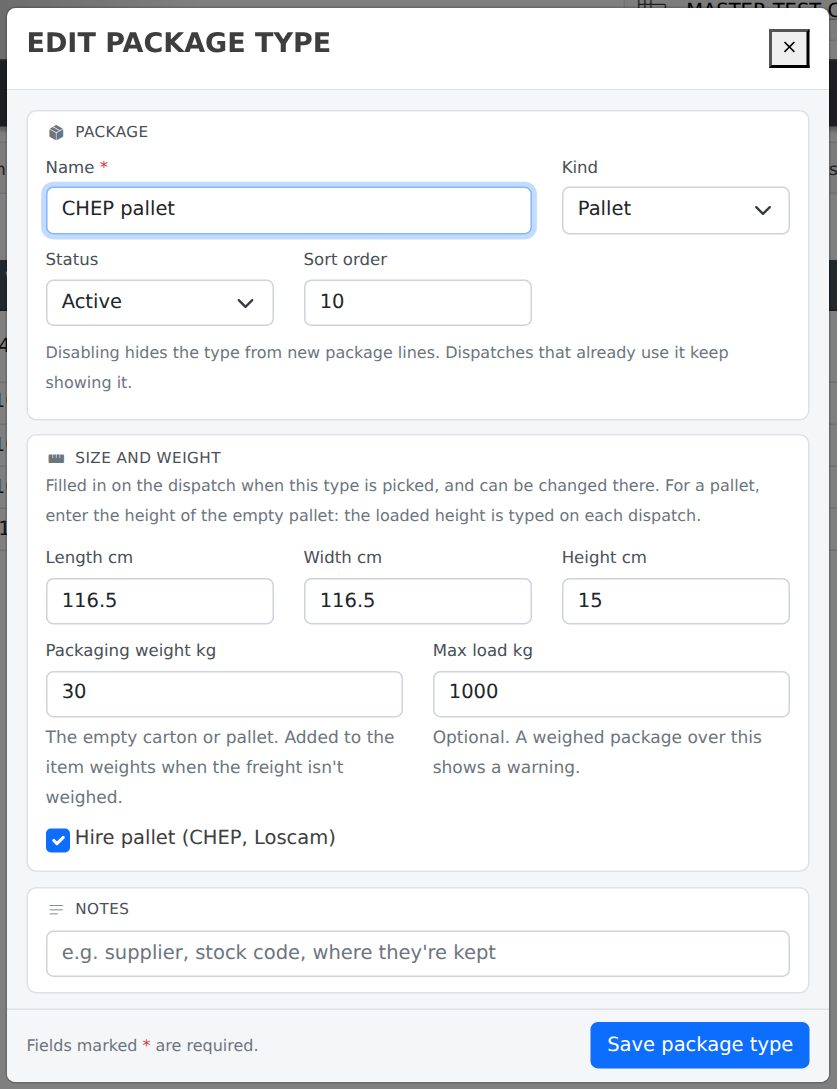
| Name | What your staff call it — Small carton, CHEP pallet, Long tube. It shows in the package list on dispatches and on the delivery docket. Required, and no two package types can share a name. |
| Kind | Carton, Pallet, Bundle, Length, Crate, Satchel or Other. The package list on a dispatch groups your types by kind. |
| Status | Active or Disabled. See Editing or Disabling a Package Type. |
| Sort order | Where the type sits within its kind. Lower numbers come first, so give the ones you use most a low number. |
| Length, Width, Height (cm) | The outside size. Copied onto the dispatch when the type is picked, where it can still be changed. For a pallet, enter the height of the empty pallet: the loaded height changes every time, so it is typed on the dispatch. |
| Packaging weight (kg) | The weight of the empty carton or pallet. It is added to the item weights to estimate the gross weight when the freight hasn’t been weighed. See How the Gross Weight Is Worked Out. |
| Max load (kg) | Optional. When a package of this type is weighed heavier than this on a dispatch, its weight box turns red as a warning. It doesn’t stop the save. |
| Hire pallet | Tick for CHEP, Loscam and other pallets you hire rather than own. It is shown on the list today, ready for pallet-account reporting. |
| Notes | Anything else your staff should know — the supplier, a stock code, where they’re kept. |
The Pallets You Start With
New databases start with four common pallets so the list isn’t empty:
- CHEP pallet — 116.5 × 116.5 × 15 cm, 30 kg, max load 1,000 kg, hire.
- Loscam pallet — the same size and weight, hire.
- Plain timber pallet — 116.5 × 116.5 × 15 cm, 25 kg, max load 1,000 kg.
- CHEP half pallet — 80 × 60 × 15 cm, 10 kg, max load 500 kg, hire.
Your cartons aren’t listed until you add them, because every business’s cartons are different.
Adding a Package Type
- Press the + button at the top right of the screen. If the list is filtered to a kind, the new type starts as that kind.
- Enter the Name and, if you know them, the size, packaging weight and max load.
- Press Add package type. It is offered on dispatches straight away.
A package type can’t be added with the same name as one already on the list, even a disabled one. Tick Show disabled to find it and re-enable it instead.
Editing or Disabling a Package Type
Click anywhere on the row and the edit window opens. Change what you need and press Save package type.
Package types aren’t deleted, because past dispatches refer to them. To stop using one, set its Status to Disabled. It drops out of the package list on new dispatches and is hidden on this screen until you tick Show disabled. A dispatch that already uses it keeps showing it, marked disabled.
Using Them on a Dispatch
On a dispatch’s Freight & Tracking card, and in the Freight panel of the Shipping hub, each package line’s Type list shows your package types grouped by kind, followed by Custom size.
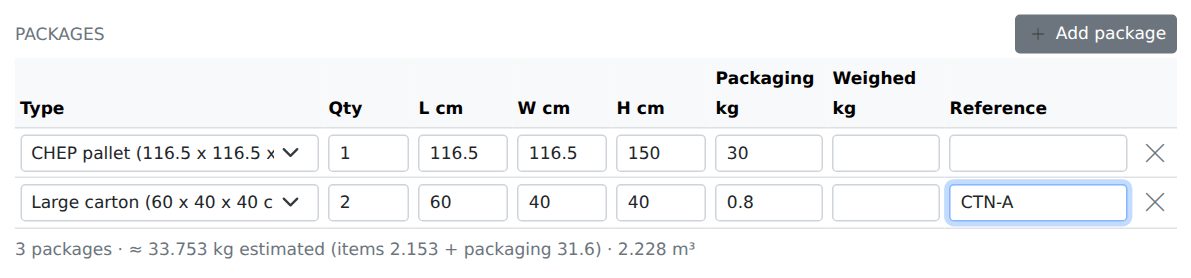
- Pick one of your types and its length, width, height and packaging weight fill in. Change any of them for this dispatch — for a pallet, type the loaded height.
- Pick a kind under Custom size for anything that isn’t one of your standard packages, and type its size as before.
See Freight & Tracking on a Dispatch for the rest of the package grid.
How the Gross Weight Is Worked Out
Each package line has two weights: Packaging kg, the empty weight of one package, and Weighed kg, what one package weighed on the scale once packed. The dispatch’s gross weight — the figure on the docket, the manifest and the Shipping hub — is:
- Every package weighed: the weighed total. The scale is the best figure there is.
- Any package not weighed: an estimate — the weight of the items on the dispatch plus the packaging weight of every package. The totals line shows it as ≈ 342 kg estimated (items 310 + packaging 32).
- No packages entered: the weight of the items, as before.
Who Can Change This
Adding and editing package types needs Administrator access or Projects set to Admin, the same as Carriers. Everyone else can see the list but can’t change it — see Setting Permissions. Every add and change is recorded in the audit log with what the field used to say.
Related Pages
- Freight & Tracking on a Dispatch — con notes, packages, freight charges and the tracking email.
- Shipping Hub — booking, manifests and tracking freight in one place.
- Carriers — the couriers and freight companies you ship with.