B2B pricing lets each trade customer see their own negotiated prices when they log in to your Shopify store. Evolution drives this: an account's contract, customer discount and category discounts are published to Shopify as a catalog and price list scoped to that company, so the storefront shows the same prices the customer would get in Evolution.
How the pieces line up
| Evolution | Shopify (Plus) |
|---|---|
| Account (company) | B2B Company |
| Account address | Company Location |
| Account contact | Company Contact (a login) |
| Contract + customer / category discounts | Catalog + Price List |
| Customer segment | Segment (customer-tag based) |
Publishing a B2B company
Use step 3 on the plugin page — Accounts Company to B2B Company — the same Company Configurator used for customers. When you publish an account on a Plus store:
- A Shopify Company is created, linked back to the Evolution account.
- The account address becomes a Company Location.
- The oldest contact on the account is used as the company's main contact by default. You can override this in the Contact column of the configurator.
Who can buy on behalf of the company
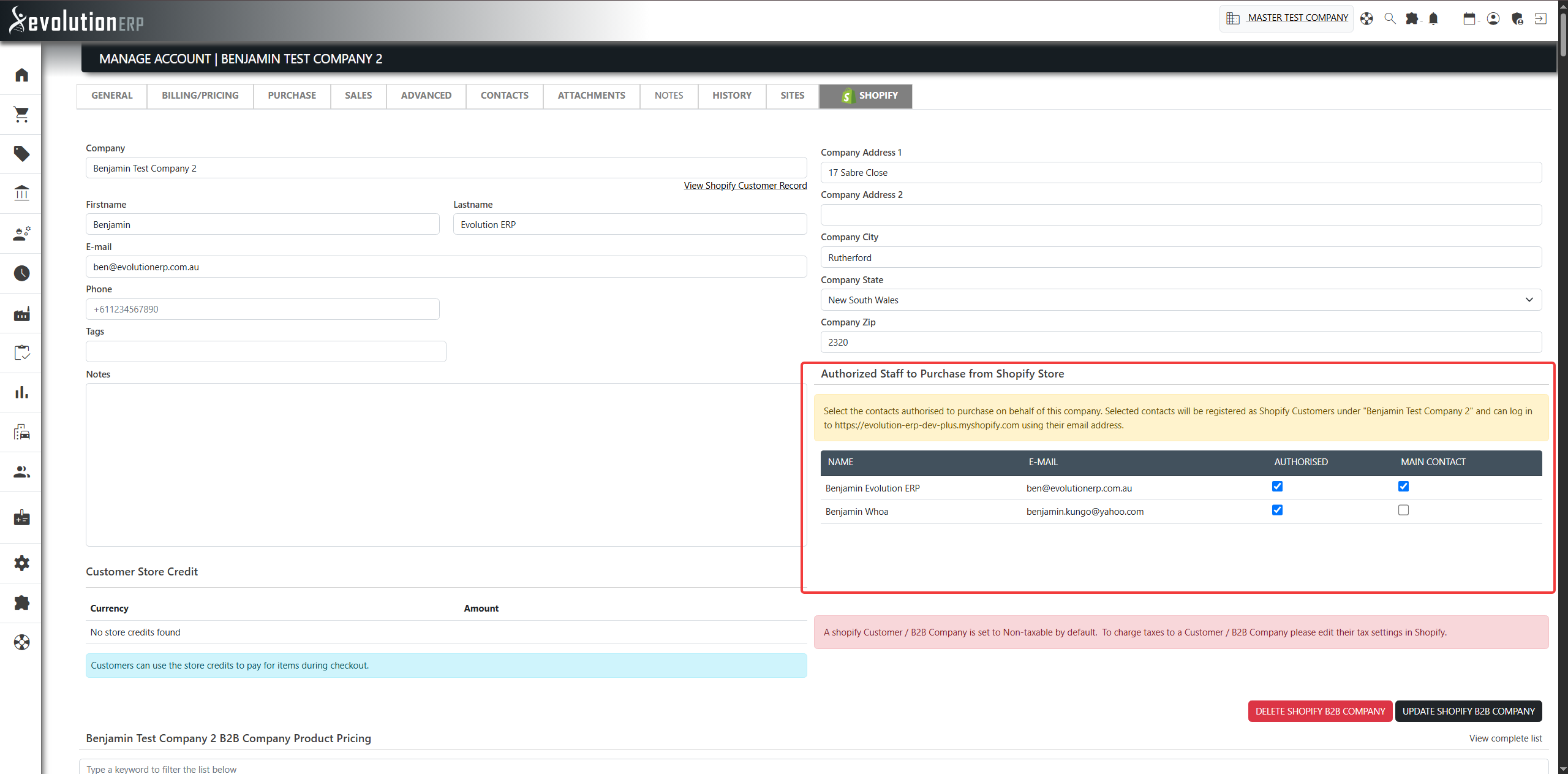
On the Customer Manager screen, the Authorized Staff to Purchase from Shopify Store section lists the account's contacts. Tick the contacts allowed to purchase for the company: each is registered as a Shopify customer under that company and can log in to your store with their email address. You can also mark the main contact.
Payment terms
An account's Evolution payment term is mapped to the equivalent Shopify payment-terms template on the company, for example:
| Evolution term | Shopify template |
|---|---|
| COD | Due on receipt |
| 7 Days Net | Net 7 |
| 30 Days Net | Net 30 |
| 45 Days Net | Net 45 |
| 60 Days Net | Net 60 |
| 90 Days Net | Net 90 |
Where no term is set, COD is used as the default.
How a company's prices are chosen
When Evolution builds a company's catalog, it decides which pricing applies in this order:
- The contract mapped to the company's customer segment, if the company is assigned to one.
- Otherwise, a contract set directly against the account.
- Otherwise, a contract the account is linked to through the contract's customer list.
On top of the contract, the account's customer discount and any category discounts are applied. Only active, unexpired contracts are used. If no pricing applies, the company's catalog and price list are removed so it falls back to standard prices.
Catalogs, price lists and segments
- A catalog is created for the company and scoped to its location(s). Its title reflects what drives the pricing (customer discount, category discounts and/or the contract name).
- A price list holds the per-product prices — the contract price for contracted items, plus category-discounted prices for the rest — and is attached to the catalog.
- Segments group companies by a customer tag. You can create custom segments and map each one to a contract, then assign companies to a segment so they inherit that contract's pricing.
Keeping pricing up to date
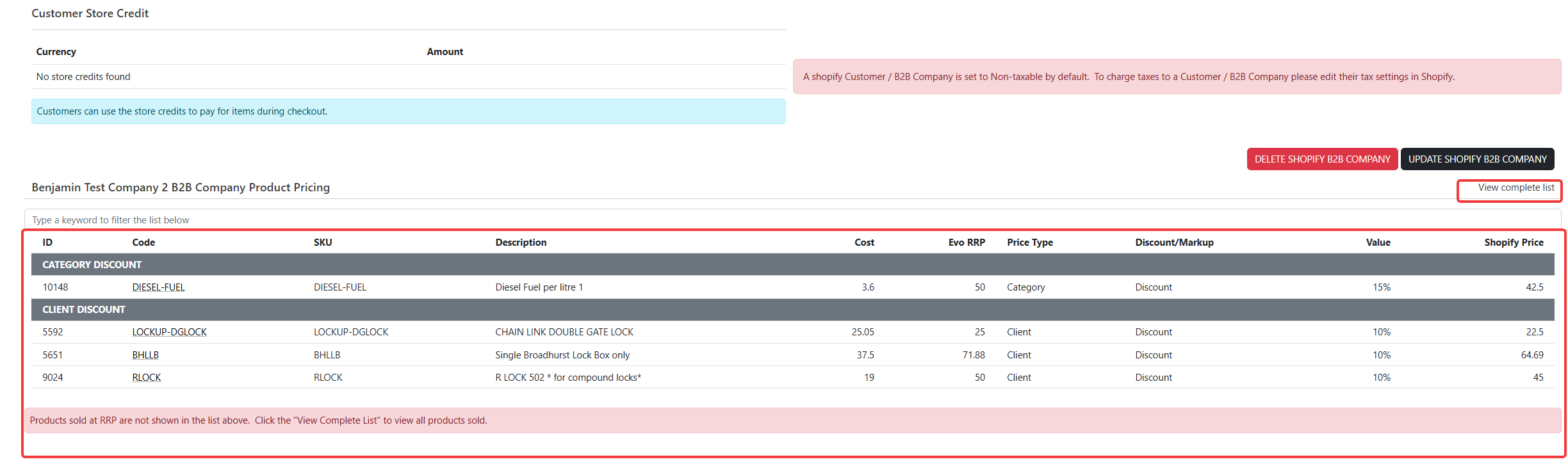
With real-time price sync enabled, a company's catalog is built as soon as the company is created. After that, when you change the account's customer discount or category discounts in Evolution, the catalog and price list are rebuilt so the storefront prices stay correct. The per-customer prices are also shown on the Customized Shopify Product Pricing for this Customer tab of the Customer Manager, where you can review the cost, RRP, price type, discount/markup and resulting Shopify price for each item.