
Evolution covers a lot of ground — sales, projects, the workshop, the warehouse and the ledger — and each of those worlds arrived with its own vocabulary. This page is the single list of what each object is called, what it actually represents, and where you will find it.
If you have ever wondered whether a Planned Activity is the same thing as a Task, or what separates a Production Order from a Shop Floor Order, start here. The last two sections — Words We’ve Retired and Easily Confused — are the ones worth bookmarking.
How to Read This Page
Three naming rules run through the whole system. Everything below follows them.
1. Project, not Job
The record that carries a piece of work from quote to invoice is a Project. It used to be called a Job, and you will still see that word in two legitimate places: on the shop floor, where “the job” is what is in front of you on the bench, and in Job Costing, which is the accepted accounting term for costing work against a project. Rule of thumb: “job” names an accounting method or a thing on a bench; “project” names the record in Evolution.
2. Account is the parent; Customer and Supplier are its types
A business you deal with is an Account. Its type is either Customer (you sell to them) or Supplier (you buy from them) — and an account can be both. Wherever a label has to cover both at once, it reads Account. We no longer use Client or Vendor.
3. Contacts are people, Accounts are businesses
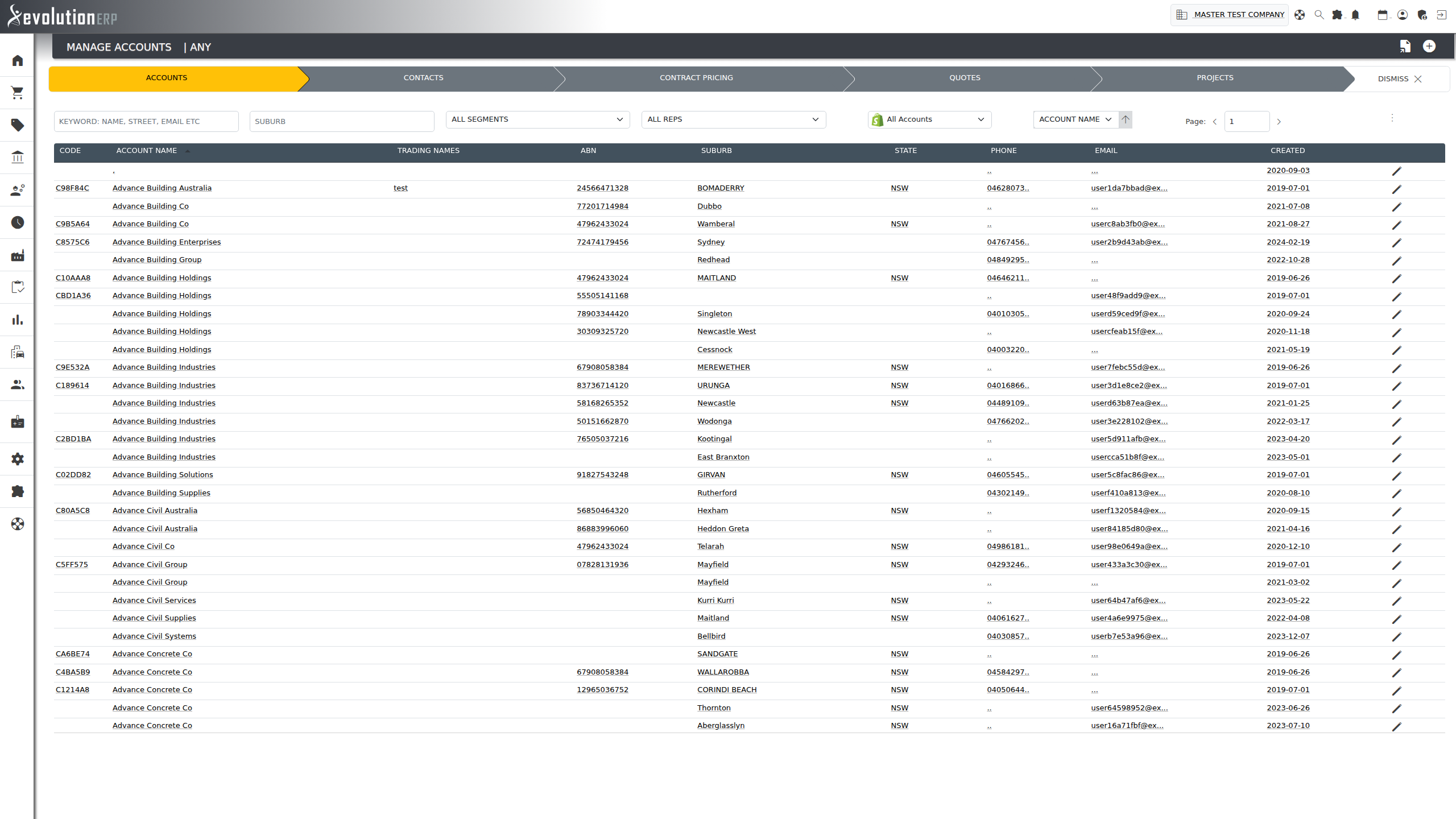
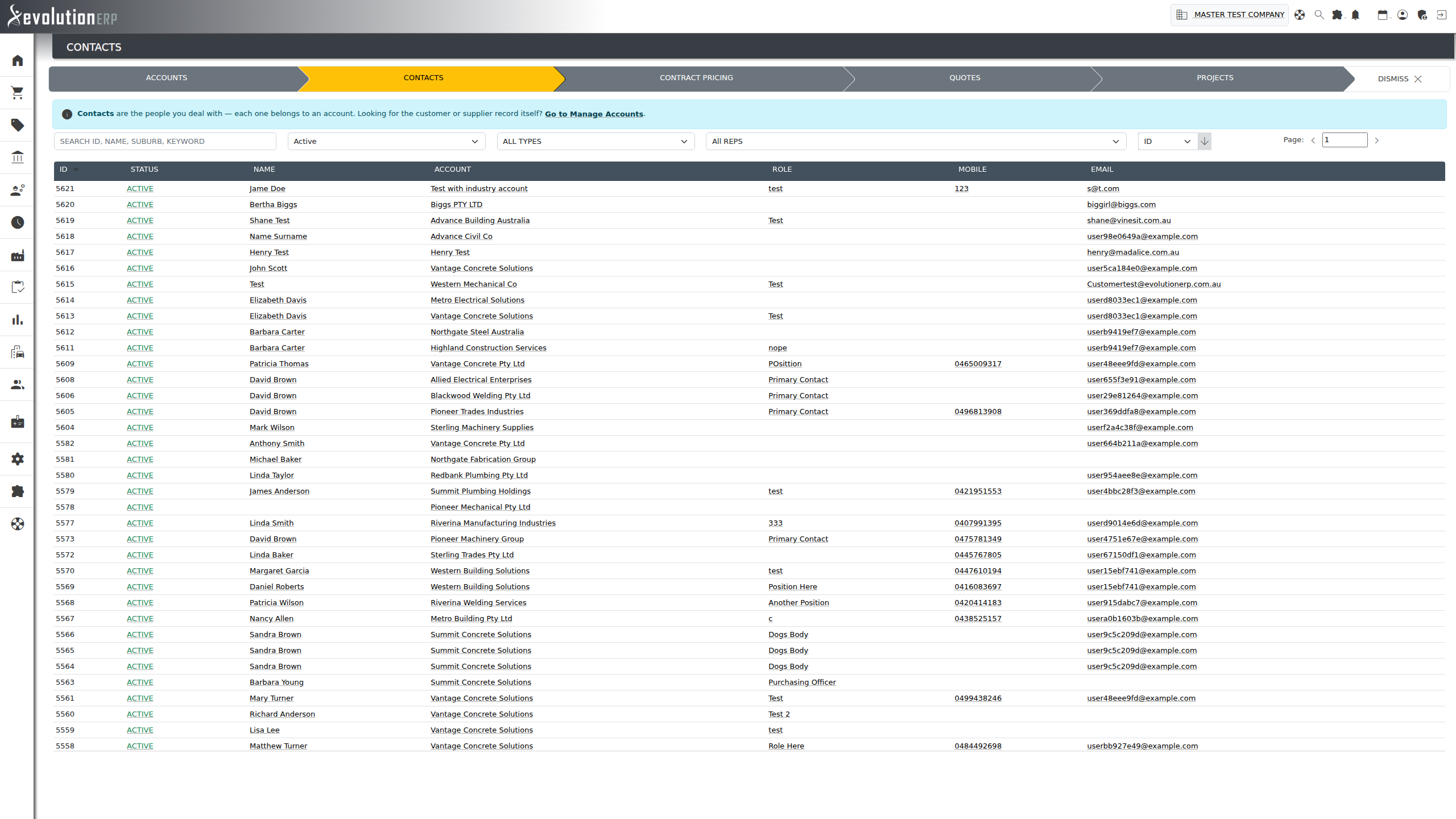
A Contact is always a person — someone who works at an account. It is never the business itself. If a screen is asking you to pick the business, it will say Account, Customer or Supplier.
People & Accounts
| Term | What it is |
|---|---|
| Account | A business you trade with. Holds the trading name, ABN, addresses, payment terms, credit limit, price level and rep. Found under Contacts › Manage Accounts. |
| Customer | An account you sell to. Quotes, projects and invoices are raised against a customer. |
| Supplier | An account you buy from. Purchase orders and bills are raised against a supplier. The same account can be flagged as both a customer and a supplier. |
| Contact | A person at an account — name, role, email, mobile, preferred contact method. Contacts have their own full-page view with their sites, history and activity. |
| Site | A physical location belonging to an account: a depot, a branch office, a site address. Contacts can be linked to the sites they work at, and activities can be booked to a site. |
| Customer Segment | A named group of customers used for reporting and targeted mail-outs. Segments are either static (you choose the members) or dynamic (membership is recalculated from a rule). |
| Rep | The staff member who owns the commercial relationship with an account. |
| Staff | Your own people. Distinct from contacts, who belong to someone else’s business. |
| Branch | One of your own operating locations. Stock, purchase orders, dispatches and the ledger can all be scoped to a branch. |
Winning the Work
| Term | What it is |
|---|---|
| Sales Lead | An unqualified enquiry. The lightest record in the system — a name, a contact detail and a note about what they want. Leads are converted into opportunities. |
| Sales Opportunity | A qualified piece of potential work, tracked through pipeline stages with a value, a probability and an expected close date. Opportunities can carry their own tasks and can create the account and contact for you when they are won. |
| Quote | A priced offer to a customer. A quote holds line items, options and margins. Winning a quote imports it into a project. |
| Quote Option / Optional Extra |
A section of a quote the customer can accept or decline. Extras can be ticked on or off after the quote has been imported into the project. |
| Contract Pricing | Agreed prices for a specific customer, applied automatically when you quote or invoice them. Sits on the account, not the quote. |
| Price Level | A tier of pricing (retail, trade, wholesale and so on) assigned to an account. |
The Project
The Project is the spine of Evolution. Almost everything else in the system either feeds a project or is produced by one.
| Term | What it is |
|---|---|
| Project | A piece of work for a customer, with its own reference, project number, owner, dates, budget and cost history. Opened from the Project Register; worked on in Project Management. |
| Project Register | The searchable list of every project, filtered by status, customer, project manager or category. |
| Project Management | The project’s own screen. Its tabs are the modules the project touches: General, Quotes, Inventory, Picking, Dispatch, Manufacture, Purchasing, Claims, Job Costing, Files, Servicing, Field Staff, Timesheets, WHS/Quality and My Data. |
| Project Inventory | The lines of what the project will supply — the imported quote, plus anything added later. This is the list that drives picking, dispatch, manufacturing and invoicing. Each line has a quantity, a cost and a sell price. |
| BOM Bill of Materials |
The components that make up a parent item. A BOM defined on the stock item is the default; it can be overridden on the quote line, and overridden again on the project line, so the project keeps what was actually agreed. |
| Project Manager | The staff member accountable for delivery. Distinct from the Rep, who owns the account. |
| Defect | A fault raised against a project or a delivered item, tracked to resolution with its own contact, description and status. |
| Timesheet | Labour booked by a staff member against a project (and optionally an activity or a workshop process). Timesheets are what turn hours into project cost and, where the project is charged that way, into invoice lines. |
Planned Activities
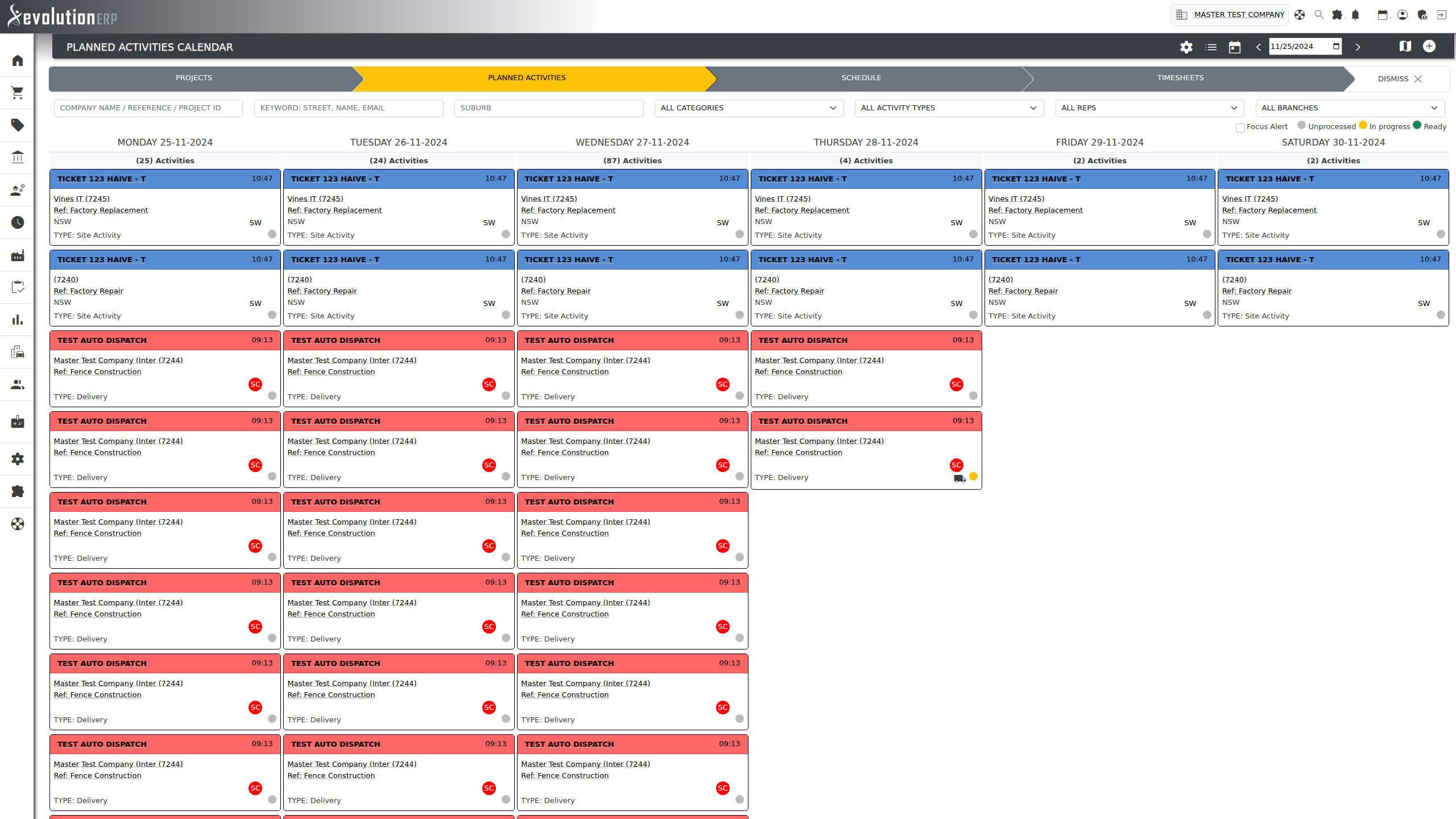
A Planned Activity is a dated block of work on a project. It answers what is happening, for whom, where, and when.
It is the scheduling object in Evolution. A project might carry a dozen activities across several months: a site measure, three deliveries, an install week, a final inspection. Each one has its own dates, its own type, its own site, and its own progress.
What an activity carries
| Account | The customer the work is for. |
| Project | The project it belongs to. Every activity belongs to exactly one project. |
| Title & description | What is being done. |
| Site & suburb | Where it is being done. The suburb shows on the calendar card so crews can be grouped geographically. |
| Start and end date | The window the work sits in. An activity can span several days. |
| Type | Delivery, Pickup, Freight, Site Activity, Scheduled Maintenance, Site Visit, Other — and any type you add yourself. Each type carries a colour so the calendar is readable at a glance. Types are maintained in settings. |
The three progress indicators
Each activity card carries three independent status dots. They are what the calendar legend — Unprocessed / In progress / Ready — is describing, and they use the same colour scale:
| Indicator | Answers |
|---|---|
| Inventory | Have the goods for this activity been allocated and picked? |
| Assignment | Has anyone — staff, subcontractor or plant — been booked to it? |
| Task | Are the to-dos attached to it finished? |
Red means nothing has been done yet, Amber means it is partly done, and Green means that strand is complete. An activity is Ready when all three are green.
Assignments
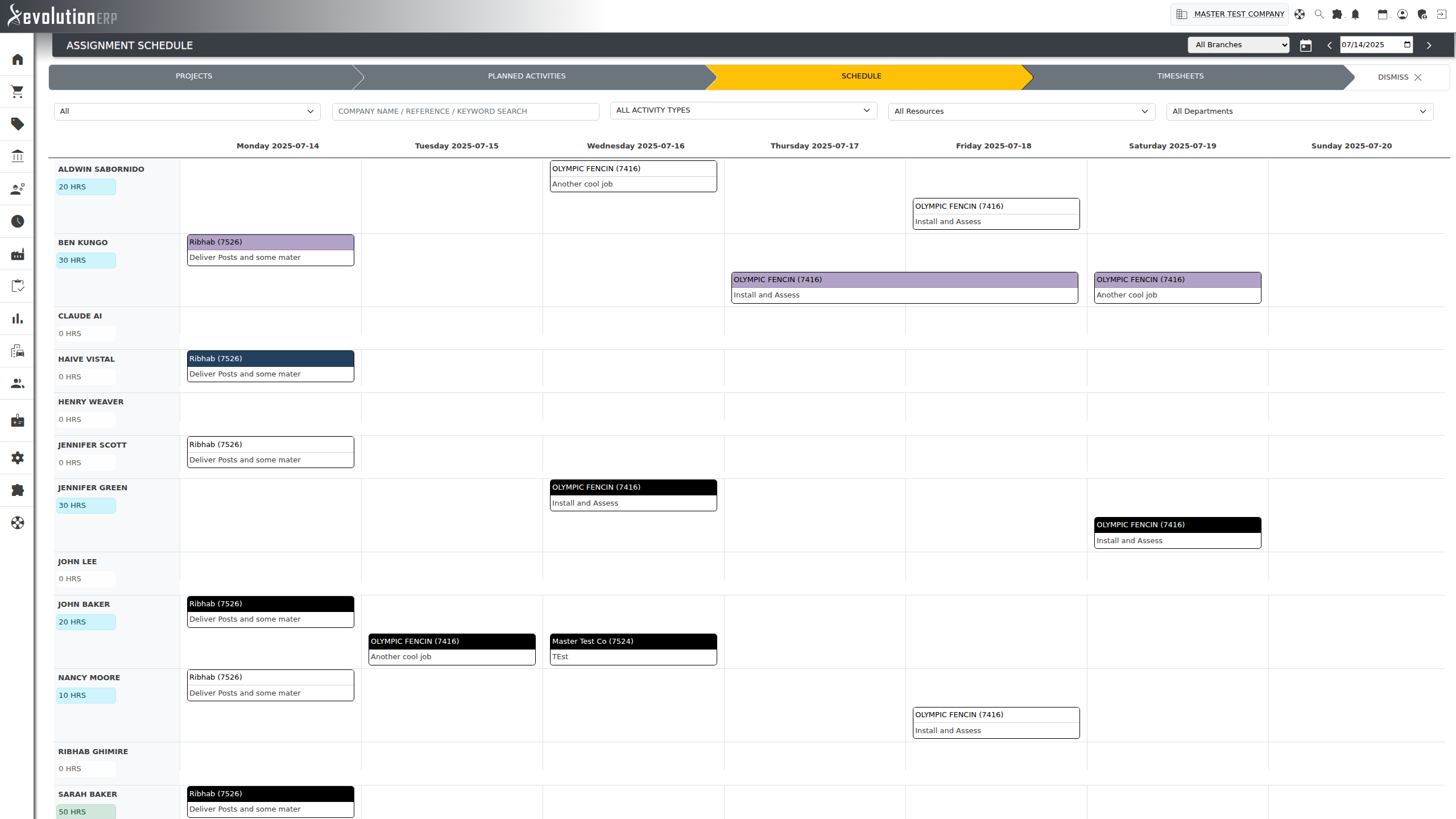
An Assignment attaches a resource to an activity. There are two kinds, and both live under the same word:
- Inventory assignment — a project inventory line allocated to the activity, with the quantity going out on that visit. This is what tells the warehouse what to pick for Thursday’s delivery, and it is what drives the activity’s inventory status dot.
- Resource assignment — a staff member, a subcontractor account, or a piece of plant or equipment booked to the activity for a date range. This is what fills the Assignment Schedule.
Tasks
A Task is something one person has to do, by a certain date. Tasks are the general-purpose follow-up mechanism — they attach to almost anything in Evolution.
What a task carries
| Title & description | What needs doing. |
| Assigned to | The one person responsible. A task has a single owner. |
| Subscribers | Additional people who want to see the task and its updates without owning it. |
| Required by | The due date. This is what drives overdue highlighting and the reminder notifications. |
| Start / end date and time | Optional scheduling, used when the task should appear as a block on a calendar rather than just a due date. |
| Source | The record the task hangs off — see below. |
| Notes | The running conversation on the task. |
| Close-out | What was actually done, recorded when the task is completed. |
Where tasks can be raised
A task’s source is the record it belongs to. Tasks can be raised against a Project, a Sales Opportunity, a Sales Lead, a Quote, a Purchase Order, a Defect, an Account, a Planned Activity, or nothing at all — a general task with no parent. Opening the task from the calendar takes you straight to whatever it is attached to.
In practice the overwhelming majority of tasks in a live system are raised against projects, with opportunities a distant second.
Task Templates
A Task Template is a named checklist that creates a whole set of tasks in one go. Each template has a name, a target (Projects, or Projects and Opportunities), and an ordered list of task lines — each with its own title, default assignee and due-by offset. Applying the template to a project raises every task on it at once. Use them for anything that always runs the same way: a new-site mobilisation, a handover pack, a standard procurement sequence.
For step-by-step instructions on raising, assigning and closing tasks, see the Tasks guide.
Manufacturing
Manufacturing has the densest vocabulary in Evolution, because it models both what is being made and how the workshop is loaded. The pipeline runs Processes → Routes → Projects → Production Orders → Shop Floor Orders → Process Queues → Calendar, and that strip appears across the top of every manufacturing screen.
Defining how you make things
| Term | What it is |
|---|---|
| Process | One operation the workshop performs — cutting, welding, powder coating, assembly. A process carries its setup cost and time, its running cost, its lead time, its unit of measure, and its daily capacity in minutes. It can be marked external when the operation is sent out. |
| Daily capacity | How many minutes of that process you can do in a day. This is the number every ETA in the system is calculated from — a process with no capacity set cannot forecast, and the shop order screen will warn you about it. |
| Route | An ordered sequence of processes — the recipe for making a given kind of item. Routes are reusable; you attach one to an item and every shop order for that item inherits its steps. |
Making the things
| Term | What it is |
|---|---|
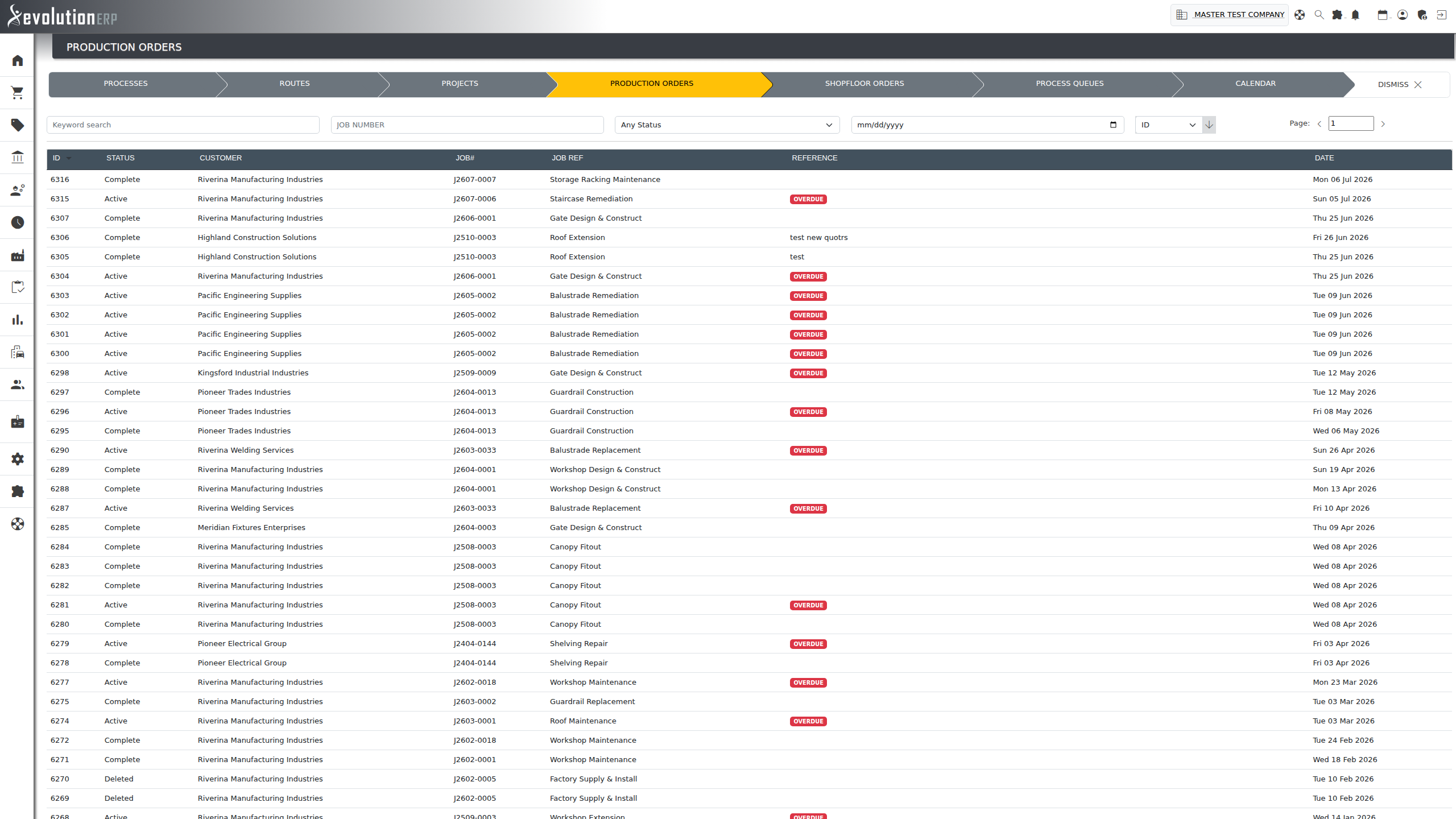
| Production Order | The workshop’s instruction for a project. One production order covers a batch of work released to the factory at once, and carries the customer, the project, the project reference and a required-by date. It is the header. |
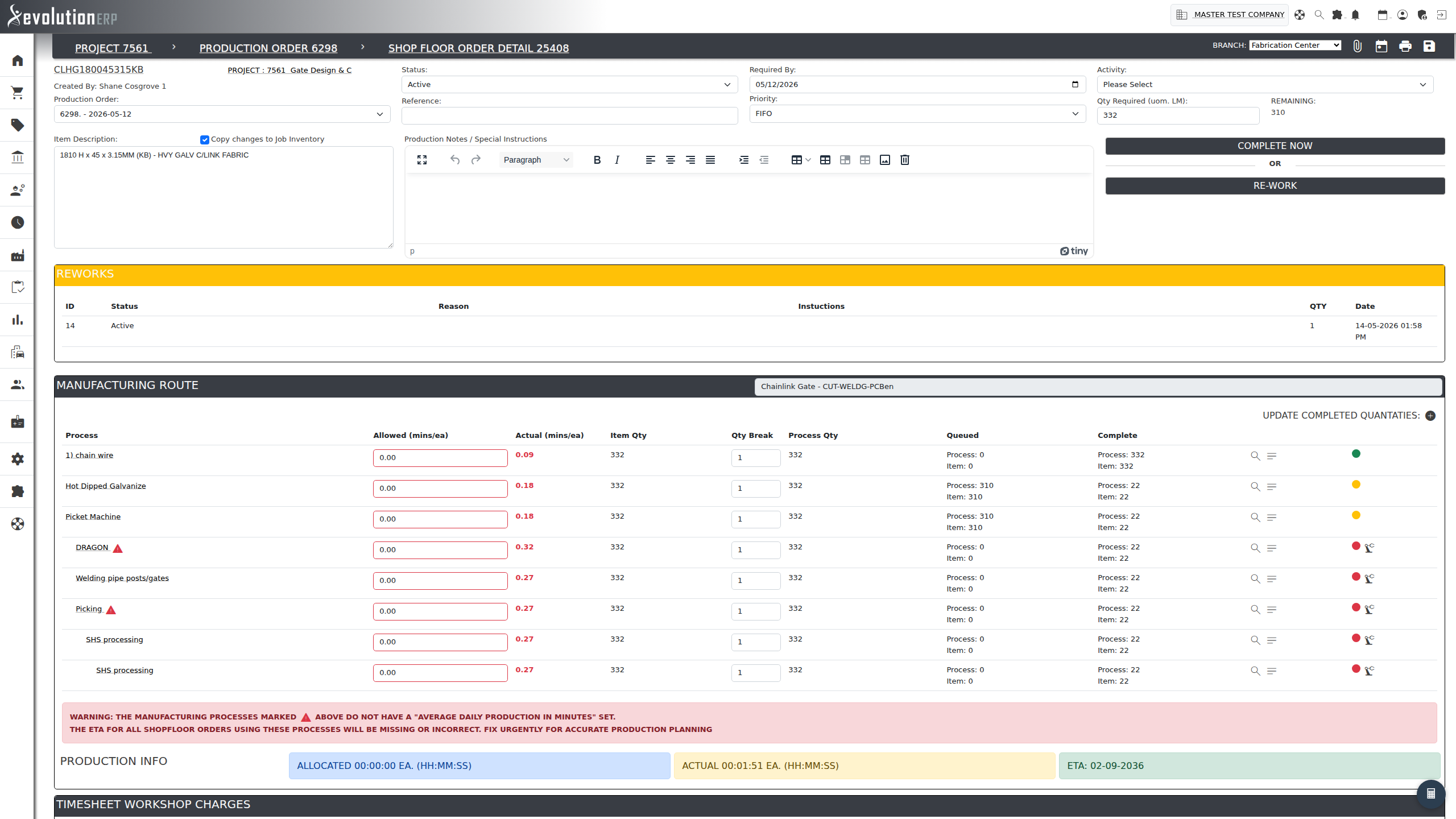
| Shop Floor Order | One item to be made, sitting under a production order. This is the record the workshop actually works to: it names the item, the quantity required, the quantity completed, the route it follows and the materials it consumes. A production order typically holds several shop floor orders. |
| Child Shop Floor Order | A shop floor order raised for a sub-assembly of another shop floor order. Children are shown indented under their parent and must finish before the parent can. |
| Manufacturing Route on a shop order |
The route’s steps, instantiated on that specific shop order. Each step has its allowed minutes each, its actual minutes, the quantity to process, the quantity break, whether it is queued, and whether it is complete. |
| Quantity break | How many units one pass of a process handles. A step with a quantity break of 10 runs once for every 10 units, not once per unit. |
| Manufacturing BOM | The materials issued against a shop floor order. Inherited from the item’s bill of materials, and adjustable per order — extras added on the floor are marked as such. |
| Production Booking | A record of work actually done: which process, on which shop order, by whom, for how long, for what quantity. Bookings are what fill in the actual minutes against the allowed minutes. |
| Rework | Work redone because something was wrong. A rework names the processes to be repeated, the reason, the instructions, the quantity and who approved it — so rework time is visible rather than buried in the original booking. |
| Factory Session | A block of shop-floor time, started and stopped by staff, covering one or more process steps. Sessions are how the workshop clocks on and off; they feed the factory activity reporting and can span several people on the same step. |
Loading the workshop
| Term | What it is |
|---|---|
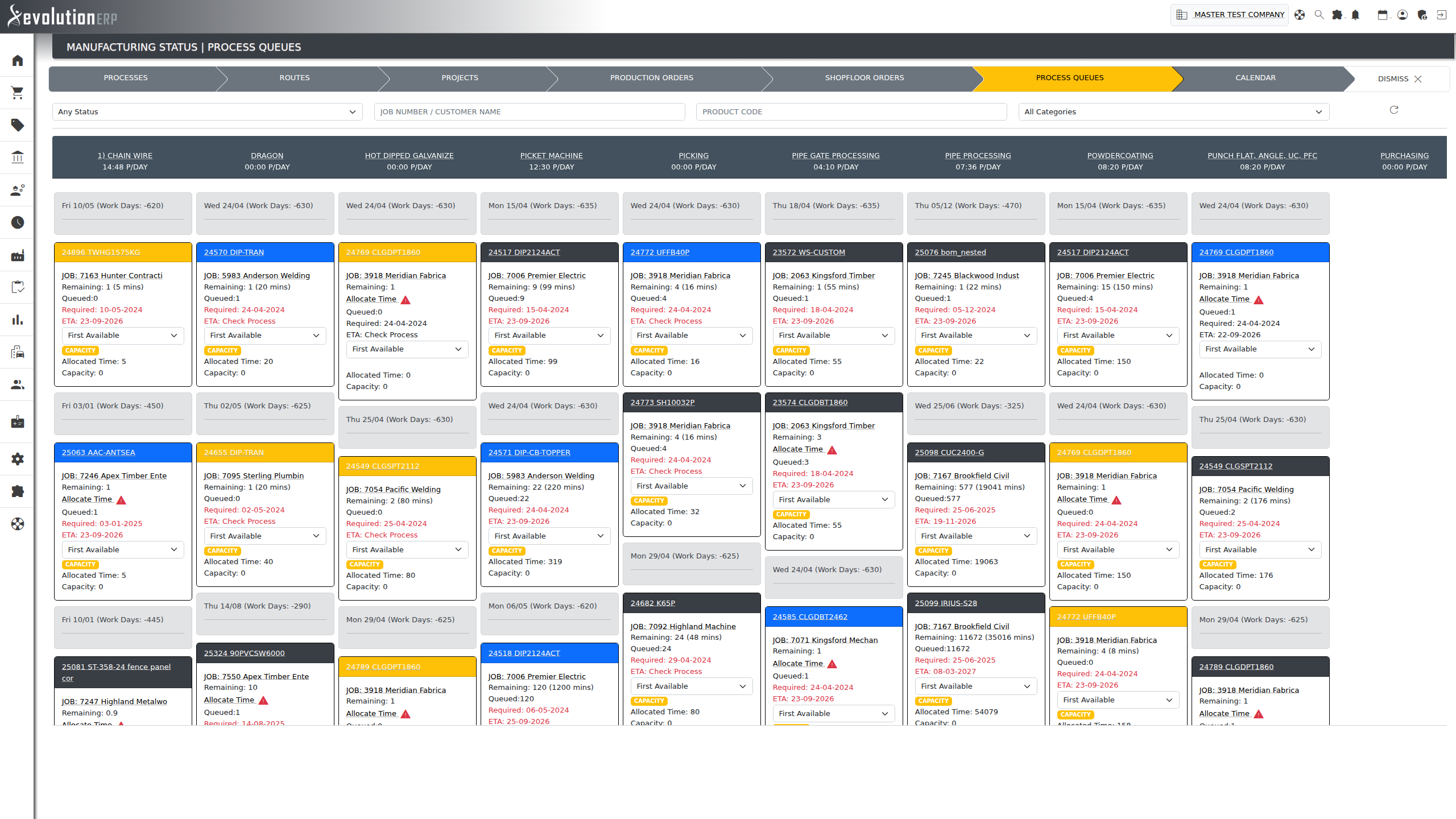
| Process Queue | Everything waiting at one process, in the order it will be done. Each queue shows its daily capacity, the minutes queued against it and the resulting completion date — which is how a required-by date at the end of a route gets validated against real capacity. |
| Manufacturing Status | The screen that shows every process queue side by side. The workshop’s load in one picture. |
| Pending Items | Project lines that need making but have not yet been released to a production order. The workshop’s in-tray. |
| Workshop Requisition | A request from the floor for materials needed to complete manufacturing. Distinct from a purchase requisition — see Easily Confused. |
| Production Activities Calendar | The manufacturing calendar — shop floor orders laid out against the dates they are due, so the factory can see its week. |
Buying
| Term | What it is |
|---|---|
| Purchase Requisition | A request to buy. Raised by anyone, against a project or for stock, before a supplier has been chosen. Requisitions are gathered up and turned into purchase orders. |
| Purchase Order | A committed order to a supplier, with line items, prices, a delivery address and a required-by date. Once a purchase order is marked sent it is frozen — further requisition lines go onto a new order rather than being appended. |
| Receive Goods | Booking in what actually arrived against a purchase order. This is what moves stock on hand and what clears the on-order figure. |
| Purchase Back Order | The part of a purchase order the supplier has not delivered yet. |
| Bill | The supplier’s invoice to you — accounts payable. Matched against the purchase order and the goods received. |
| On Order | Stock you have ordered but not yet received. Visible per branch and in total. |
Stock & Movement
| Term | What it is |
|---|---|
| Item | Anything you buy, make, hold or sell. Items carry a code, a description, a unit of measure, costs, sell prices and, where relevant, a bill of materials and a manufacturing route. |
| Unit of Measure | How an item is counted — each, metres, hours, tonnes. A unit of measure typed as Time is what tells Evolution a line is labour rather than stock. |
| Stock on Hand (SOH) | What is physically in the building, per branch. |
| Available | Stock on hand less what is already committed to projects. The number that matters when you are promising a date. |
| Bin | A location within a branch. Items can be mapped to bins for picking and for re-order. |
| Picking | Pulling goods off the shelf and staging them for a project. Picking is stock-neutral — it moves goods from general stock into staging, it does not consume them. |
| Dispatch | Goods leaving the building to the customer. Dispatch is what consumes the stock, and it is what a delivery docket is printed from. A committed dispatch can be invoiced directly. |
| Runsheet | A day’s deliveries grouped for a driver or a vehicle. |
| Stocktake | A count of what is actually on the shelf, and the adjustment that reconciles the system to it. |
| Stock Movement | The audit trail: every in and out against an item, with its source document. |
| Items To Follow | The customer-facing back-order list — what was ordered but not supplied, appended to the paperwork so the customer knows what is still coming. |
Charging & Money
| Term | What it is |
|---|---|
| Invoice | Your charge to a customer — accounts receivable. Raised from a project, a dispatch, a quote import or directly. |
| Claim | A progress claim: invoicing a percentage of a project as it is completed, rather than the whole thing at the end. Common on construction contracts. |
| Retention | Money the customer holds back until a defects period expires, released later. |
| Credit Note | A reversal — against a customer invoice (AR) or a supplier bill (AP). The credit note’s type determines whether it puts stock back on the shelf. |
| Payment | Money in against an invoice, or money out against a bill. Payments are allocated to the documents they settle. |
| Job Costing | Comparing what a project earned against what it cost — materials, labour, subcontract and overhead. Kept as an accounting term by design; it is the one place “job” is still correct in the office. |
| General Ledger | The accounts every transaction posts to. Sales, cost of goods sold, stock, accounts receivable and accounts payable all have control accounts. |
| Cash Sale | An over-the-counter sale, invoiced and paid in one step, with no project behind it. |
| Credit Limit / Stop Credit |
The ceiling on what an account may owe, and the block that applies when they exceed it. |
Assets & Compliance
| Term | What it is |
|---|---|
| Asset | Something you own and track — plant, vehicles, tools, site equipment, electrical test items. Assets carry their type, branch, service history and compliance dates. |
| Asset Booking | An asset issued to a staff member or a subcontractor for a period, and returned. Bookings appear on the Assignment Schedule alongside people. |
| Maintenance Record | A service performed on an asset, with its date, cost and next-due date. |
| Qualification | A ticket, licence or induction held by a staff member, with an expiry. Qualifications can be scoped to a specific account or to every account. |
| WHS | Work health and safety records attached to a project — SWMS, inductions, toolbox talks, incident reports. |
Words We’ve Retired
These words used to appear in Evolution and no longer do. If you still see one, it is a leftover — let us know where.
| Retired | Use instead | Note |
|---|---|---|
| Project | Except on the shop floor, and in Job Costing. | |
| Customer | Customer was already the majority word in the screens and the documentation. | |
| Supplier | Kept only where an external system’s own field is literally named “vendor”. | |
| Account | Contact is now reserved for people. Some connected systems — accounting and CRM platforms — call a business a “contact”; on those integration screens we keep their word, because it is their field. | |
| Contacts | The menu item and the screen title now match. | |
| Account | Where a label has to cover both, it uses the parent word rather than a slash. |
Easily Confused
Contact vs Account
A Contact is a person. An Account is the business they work for. One account, many contacts.
Contacts vs Contracts
Two menu items one letter apart. Contacts is people; Manage Contracts is agreements. Worth a second look before you click.
Planned Activity vs Task vs Assignment
An Activity is a dated block of work on a project. A Task is a to-do for a person. An Assignment puts a resource — goods, staff or plant — onto an activity.
Picking vs Dispatch
Picking moves goods into staging and does not change your total stock. Dispatch sends them out the door and does.
Purchase Requisition vs Workshop Requisition
A Purchase Requisition asks to buy something from a supplier. A Workshop Requisition asks for materials to finish a manufacturing order.
Production Order vs Shop Floor Order
A Production Order is the batch released to the factory for a project. A Shop Floor Order is one item within it. The breadcrumb on the shop order reads Project › Production Order › Shop Floor Order.
Bill vs Invoice
A Bill is what a supplier charges you. An Invoice is what you charge a customer. Money out, money in.
Rep vs Project Manager
The Rep owns the relationship with the account. The Project Manager owns the delivery of one project.
Process vs Route
A Process is one operation. A Route is the ordered sequence of them that makes a particular item.
Quote vs Project Inventory
The Quote is what you offered. The Project Inventory is what you are actually going to supply — it starts as a copy of the won quote and then diverges as the project changes.