
Control Accounts & Tax Accounts
Every time you commit an invoice, a bill, a credit note or a payment, Evolution writes a set of matching entries into your general ledger. Most of those entries come from the document itself — the income account on each item, the stock and cost-of-sales accounts on each product. A few come from company-wide settings called control accounts.
There are only a handful of them, they are set once when a company is first configured, and then they are usually never touched again. But if one of them is missing, the ledger entries that depend on it cannot be written — so it is worth knowing which they are and where to check them.
Where the settings live
Both screens below are administrator only.
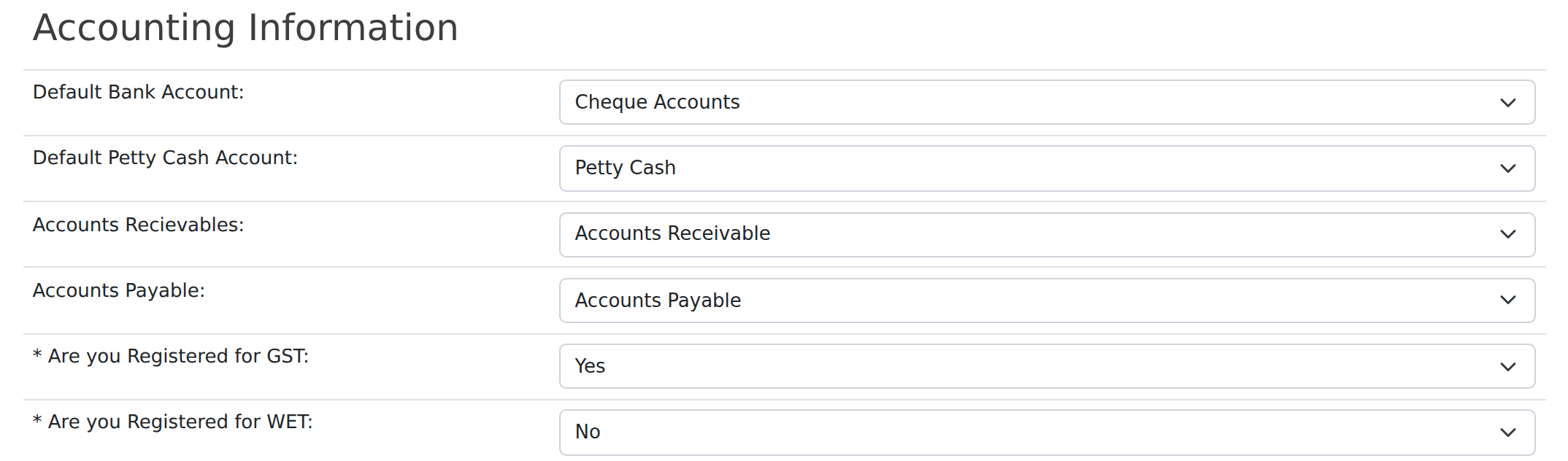
| Setting | Where | What it does |
|---|---|---|
| Accounts Receivable | Settings → Company Setup → Accounting Information | The asset account that holds what your customers owe you. Every committed customer invoice debits this account; every customer payment credits it. |
| Accounts Payable | Settings → Company Setup → Accounting Information | The liability account that holds what you owe your suppliers. Every committed supplier bill credits this account; every supplier payment debits it. |
| Default Bank Account | Settings → Company Setup → Accounting Information | The bank account payments default to, and the fallback used when a payment reaches an integration without one of its own. |
| Default Petty Cash Account | Settings → Company Setup → Accounting Information | Used for cash sales and petty-cash payments. |
| Account for Tax Collected one per tax code |
Settings → Tax Rates → edit a tax code | Where the GST you charge a customer is posted. Set this on every tax code that has a rate above 0%. |
| Account for Tax Paid one per tax code |
Settings → Tax Rates → edit a tax code | Where the GST you are charged by a supplier is posted. |
What committing an invoice actually posts
Committing a customer invoice is what turns it from a working document into an accounting transaction. Evolution posts, in one journal:
- Income — the ex-GST value of each line, to the income account on that item.
- GST collected — the tax on each line, grouped by tax code, to that tax code’s Account for Tax Collected.
- Cost of sales and stock — for stocked products, the cost out of the inventory asset account and into cost of sales.
- Accounts Receivable — the invoice total, to your Receivable control account. This is the entry that makes the invoice appear on the customer’s statement and in Aged Receivables.
Uncommitting the invoice reverses the same set of entries. The same shape applies to supplier bills, using Accounts Payable and Account for Tax Paid instead.
If a control account is missing, the commit is refused
Because the Receivable entry is the last one written, a company set up without a Receivable control account used to produce a half-finished journal: the income, GST and cost-of-sales entries were written, the Receivable entry was silently dropped, and the invoice was still marked as committed. The invoice looked fine on screen but never appeared in Aged Receivables, and the ledger did not balance.
Evolution now checks the accounts it needs before it writes anything. If one is missing, nothing is posted at all and you are told which setting to fix:
The invoice simply stays uncommitted — nothing is lost. Set the account in Settings → Company Setup and commit again, and the full journal posts normally. The same check applies to a tax code that charges GST but has no Account for Tax Collected set.
New invoices and bills are blocked until the control accounts are set
Refusing the commit protects the ledger, but it still leaves someone with a document they cannot finish. So the entry screens now check first: if the company has no Accounts Receivable account, Invoice Entry will not start a new invoice, and if it has no Accounts Payable account, Bill Entry will not start a new bill. Instead of the entry form you get a short message naming the setting to fix, with a link straight to Company Setup for administrators.
Only new documents are blocked. Anything already keyed still opens and can still be edited, saved, printed and emailed as normal — it simply carries a reminder at the top of the screen that it cannot be committed until the setting is in place.
The Default Bank Account and Default Petty Cash Account are not blocking — you can raise a document without them — but if either is unset you will see an advisory note when you start a new one, because you will need them to record the payment.
Checklist for a new company
Before entering the first invoice in a new (or newly copied) company, confirm all of the following in Settings:
- Your chart of accounts is loaded, and every account you intend to use is active and has a category.
- Company Setup → Accounting Information: Accounts Receivable, Accounts Payable, Default Bank Account and Default Petty Cash Account are all chosen — none left on Please Select.
- Company Setup: Registered for GST is set correctly.
- Tax Rates: every tax code with a rate above 0% has both an Account for Tax Collected and an Account for Tax Paid.
- Branches: at least one branch exists, since ledger entries are posted per branch.
Then commit one test invoice and check it appears in Aged Receivables and on the Profit & Loss before going any further.