
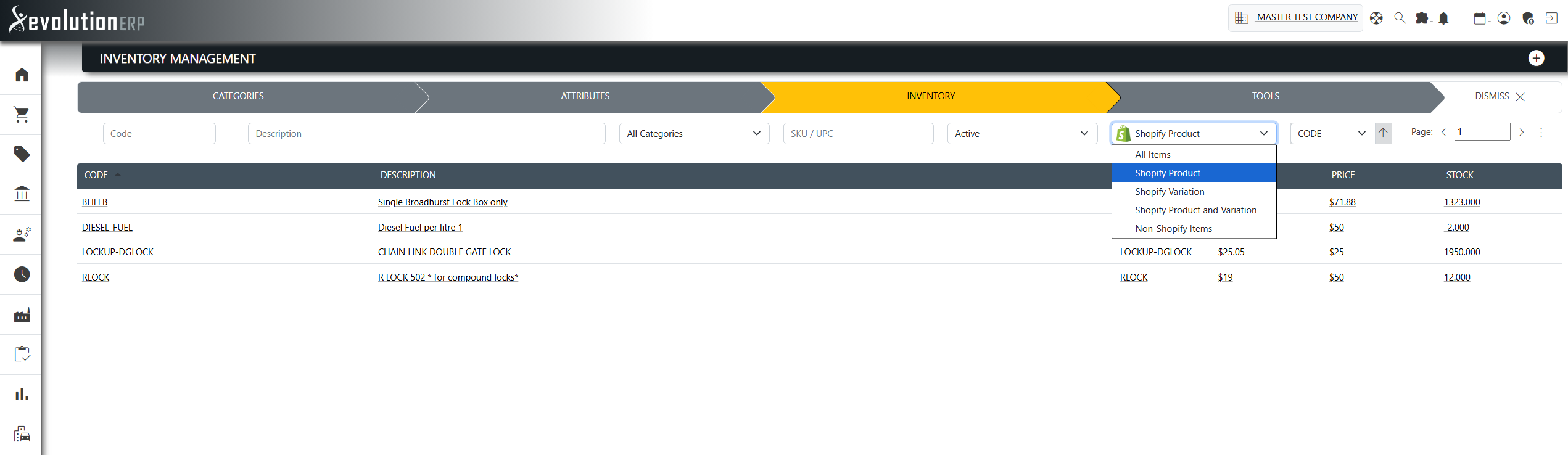
You don't have to drive everything from the plugin page. The Shopify plugin adds a Shopify status filter to the standard Evolution registers — the Inventory, Inventory Category and Accounts list screens — so you can see at a glance what is and isn't in Shopify, and act on it from where you already work. The register also remembers your last search, so the view you leave is the view you return to.
What a register is
A register is a standard Evolution list/grid screen with search and filters — for example the Inventory register or the Accounts (Customers) register. The plugin does not create its own registers; instead it injects an extra Shopify filter into the existing ones so you can slice the list by Shopify status alongside the usual filters (code, description, category, SKU, status, specifications, and so on).
The Shopify filter on each register
Inventory register
Filter items by their Shopify status:
- All Items
- Shopify Product — items published as products
- Shopify Variation — items that are a variation of another product
- Shopify Product and Variation
- Non-Shopify Items — items not in Shopify
Inventory Category register
- All Categories
- Categories in Shopify
- Categories not in Shopify
From the Category register you can open the Category Configuration and publish a category to Shopify without going back to the plugin page.
Accounts register
The Accounts (Customers) register carries the same Shopify status filter, letting you find accounts that are — or are not yet — published as Shopify customers.
Saved searches
Each register remembers the search and filters you last used, including the Shopify filter. When you reopen a register, your previous search is restored automatically and the list re-runs with it. This makes registers a practical way to curate what syncs:
- Filter the Inventory register to Non-Shopify Items in a particular category to find the backlog still to be published.
- Filter to Shopify Product to review or maintain what is already live.
- Filter the Accounts register to accounts not in Shopify to see who is yet to be published as a customer.
How this connects to the configurators
The bulk configurators on the plugin page use the same underlying data. The category picker in the Product Configurator only lists categories that have been published (started) to Shopify, and the item grid honours the same keyword, category and Shopify-status filtering you use in the registers. Curating your list in the register and publishing from the configurator are two views of the same catalogue.