
A pricebook is a list of items priced for one customer. You build the list once in the pricebook builder, then print it, or download it as a CSV file, for any customer. Each customer sees their own price, worked out from their discount or markup, their category discounts and any special prices set for them.
The layout of the printed pricebook comes from a template: an HTML file
with your logo, letterhead and terms, and merge fields such as
@customer_block; and @sections; that Evolution fills in when
the pricebook is printed.
Printing a Pricebook
- Open the customer (Sales → Contacts) and go to the pricebooks list on their record.
- Click Print Friendly next to the pricebook to open the printable page, then print it from your browser or save it as PDF.
- Click Print with CSV to open the same page and also download the prices as a CSV file.
Items are printed in one table per category, in the category sort order. Each table is headed with the category name and has the columns Code, Description, UOM, Stocked and Your Price. RRP is hidden unless the template asks for it (see Column Switches).
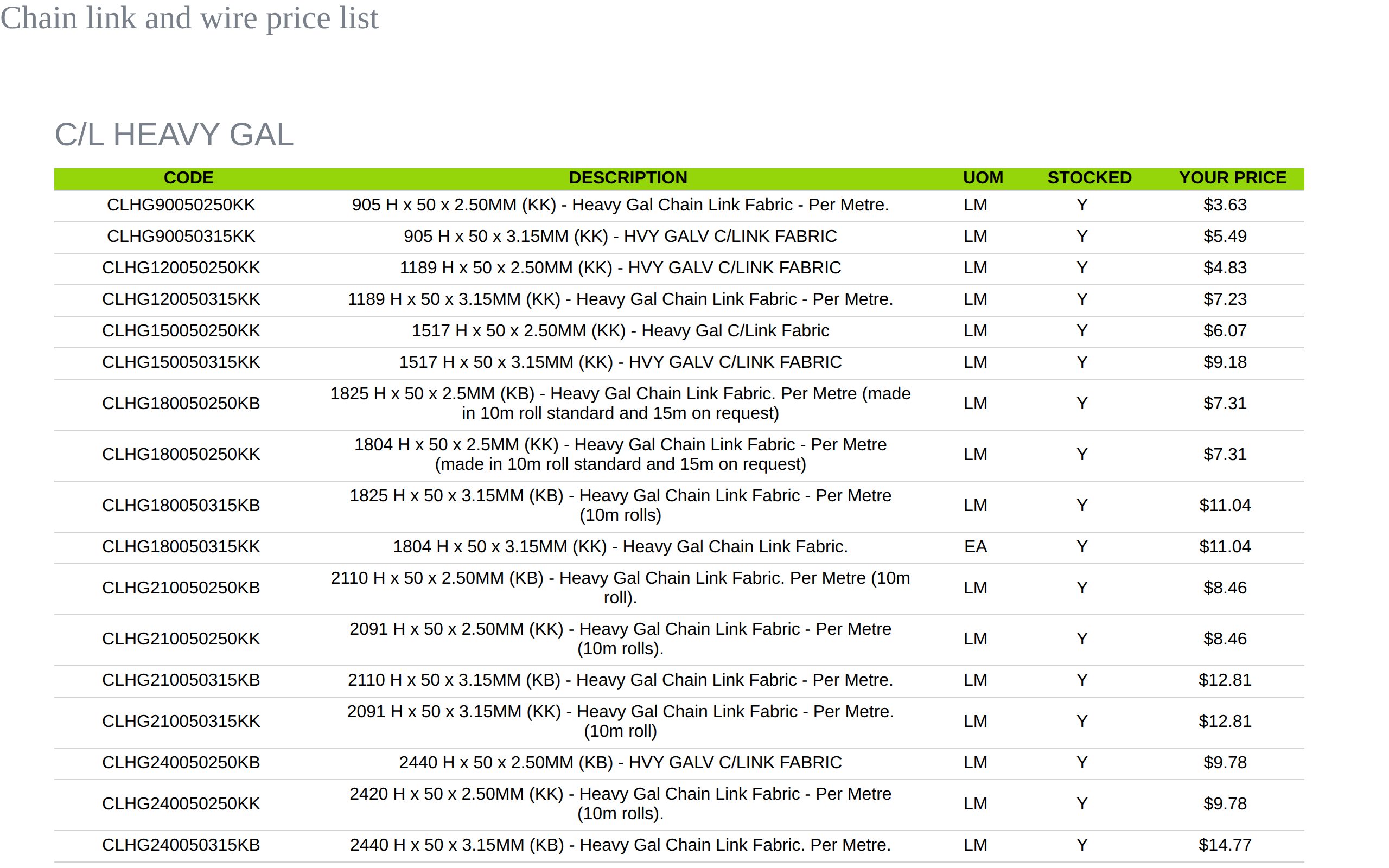
If the pricing method on the pricebook is Not Set, Evolution asks you to choose Cost+ or Discount in the pricebook builder before it will print.
The CSV File
The download is named after the pricebook and the customer, for example
Chain link and wire price list - Sterling Machinery.csv. It has one row per
item and no heading row. The columns are:
| # | Column |
|---|---|
| 1 | Item code |
| 2 | Description |
| 3 | Unit of measure |
| 4 | RRP (the item's sell price) |
| 5 | The customer's price, or Contact |
The file is made fresh each time you click and goes only to the person who downloaded it.
Pricebook Templates
A pricebook with no template prints in the standard layout: the pricebook name and description, then the price tables. To use your own layout:
- Create an .html (or .htm) file with your letterhead and the merge fields below. A print template you already use for quotes or invoices is a good starting point: most of its merge fields work in pricebooks too.
- Upload it to the Forms and Templates category in Uploads.
- Open the pricebook in the pricebook builder, choose the file under Template File and save.
Merge Fields
Type a merge field anywhere in the template, including the @ and the
semicolon. They are case sensitive.
| Merge field | Replaced with |
|---|---|
| Pricebook | |
@sections; | The price tables, one per category. @itemList; does the same. If the template has neither, the tables are added at the end of the page. |
@pricebookName; | The pricebook's name. |
@pricebookDescription; | The pricebook's description. @notes; does the same. |
@date; | Today's date. |
@id; | The pricebook's number. |
| Your company | |
@company; | Your company name. |
@companyAddress; | Your company address. |
@companyABN; | Your ABN. @abn; does the same. |
@companyPhone; | Your company phone number. |
@logoUrl; | The web address of your company logo, for an image tag: <img src="@logoUrl;" style="height:110px"> |
| Branch (the branch of the customer's account manager, otherwise your current branch) | |
@branch; | Branch name. |
@address1; @address2; @suburb; @state; @postcode; @country; | Branch address. |
@telephone; @email; | Branch phone and email. |
@bank; @bsb; @account; @remittance; | Branch bank details and remittance email. |
| Customer | |
@customer_block; | The customer's name, phone, email and postal address, one per line. |
@customerName; | The customer's name. |
@customerPhone; @customerEmail; | The customer's phone and email. |
@billingAddress; | The customer's postal address. |
@shipping; | The customer's delivery address. |
@customerLogo; | The customer's logo, if they have one, otherwise nothing. |
@terms; | The customer's trading terms, for example 30 Days Net. |
@staffinfo; | The customer's account manager: name, email and phone. |
| Ignored | |
@subtotal; @tax; @total; | Left blank, so a copied quote or invoice template prints cleanly. |
Column Switches
Put any of these anywhere in the template to change the columns in the price tables. They do not print.
| Switch | Effect |
|---|---|
@showRRP; | Shows the RRP column (hidden by default). |
@hideYourPrice; | Hides the customer's price, for example for an RRP-only price list. |
@hideStocked; | Hides the Stocked column. |
An RRP-only list, for instance, starts with
@showRRP;@hideYourPrice;@hideStocked;.
Example Template
<html>
<body style="font-family:Arial, sans-serif">
@showRRP;
<table style="width:100%">
<tr>
<td><h1>PRICEBOOK</h1><h3>@pricebookName;</h3></td>
<td style="text-align:right">@companyAddress;<br>ABN: @companyABN;<br>Phone: @companyPhone;</td>
<td style="text-align:right"><img src="@logoUrl;" style="height:90px"></td>
</tr>
<tr>
<td><b>Customer</b><br>@customer_block;</td>
<td><b>Issue date</b> @date;<br><b>Terms</b> @terms;</td>
<td><b>Account contact</b><br>@staffinfo;</td>
</tr>
</table>
<p>@pricebookDescription;</p>
@sections;
<p>Please remit to @branch; · BSB @bsb; · ACC @account;</p>
</body>
</html>Frequently Asked Questions
My printed pricebook says the template could not be used.
The template chosen on the pricebook is missing, or is not an .htm/.html file (for example a Word document or an image). Upload the template as .html to Forms and Templates and choose it again in the pricebook builder.
My old template prints, but the customer details are blank.
Older pricebook templates contained program code to fill in the customer, company and
date. That code no longer runs. Replace each piece with the matching merge field, for
example @customer_block;, @companyAddress; and
@date;, or ask Evolution support to convert the template for you.
Can a template split a category into several tables?
Not yet. Each category prints as one table, headed with the category name. To control the order of the tables, change the sort order of the categories.
Why does the price show as Contact?
The customer's price would be below cost plus 5%, or no discount or markup is set for the customer or the category. Check the customer's discount, their category discounts and the item's minimum markup or maximum discount.